
Download CHM2PDF Pilot – Convert CHM and TXT to PDF
Overview
CHM2PDF Pilot is a targeted utility designed for users who need to convert CHM (Compiled HTML Help) and TXT files into PDF format. The application addresses the common challenge of accessing documentation stored in outdated or non-standard formats by transforming them into universally readable PDFs. This makes it particularly useful for professionals, technical writers, students, and researchers who frequently work with legacy documentation, software manuals, or archived text files. The tool focuses on simplicity and efficiency, avoiding unnecessary complexity to deliver a streamlined conversion experience.
Although the developer did not provide additional background details, the app’s consistent release history since 2013 suggests a stable and reliable presence in the niche utility space. Its enduring relevance indicates that it fulfills a real need for users who require a no-frills conversion tool. Real-world use cases include digitizing old software help files, preparing reference materials for presentations, or organizing academic notes stored in plain text. In the broader app ecosystem, CHM2PDF Pilot occupies a specialized but valuable role, serving as a bridge between legacy file formats and modern document standards.
Key Features & Functionality
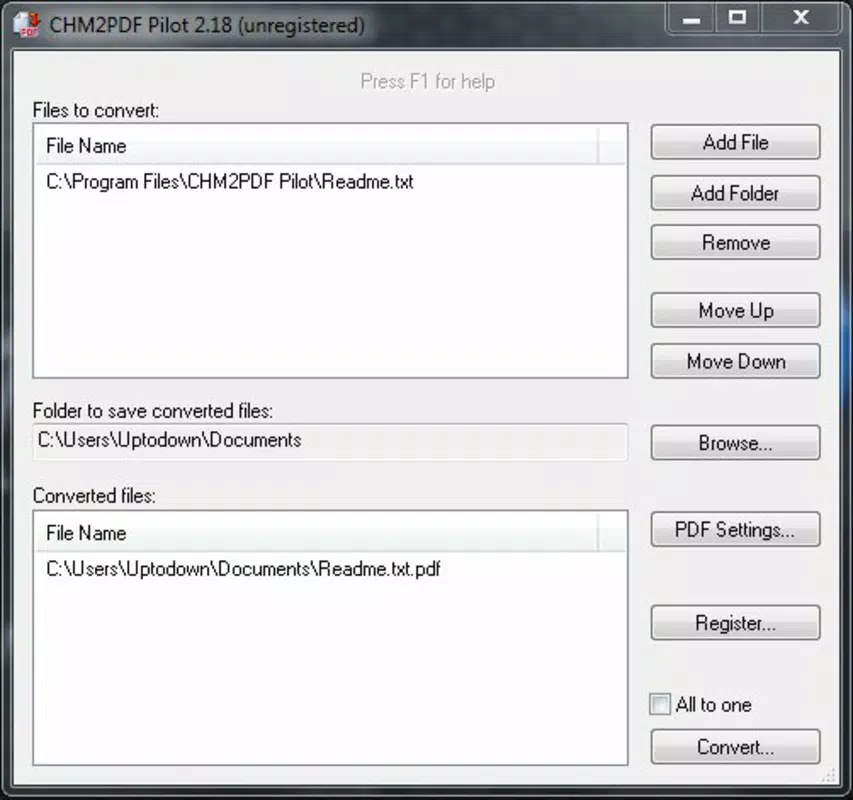
- User-Friendly Interface: The program features a minimalistic design with only essential controls—'Add File' and 'Convert'—allowing users to focus on the task without distractions. This simplicity benefits beginners and experienced users alike, reducing the learning curve.
- Batch Conversion Capability: Users can process multiple CHM and TXT files simultaneously, significantly reducing time spent on repetitive tasks. This is ideal for bulk processing of documentation sets or large archives.
- Customizable PDF Metadata: During conversion, users can define the subject, title, and author fields in the resulting PDF. This enhances document organization and traceability, especially in professional or academic environments.
- Efficient File Handling: The workflow is straightforward: select input files, choose output location, and initiate conversion. The tool maintains performance even with moderately sized files, ensuring a smooth and responsive experience.
- Encoding Support: CHM2PDF Pilot includes encoding capabilities during conversion, improving compatibility across different PDF readers and platforms. This ensures that the output remains accessible and visually consistent.
For example, a technical writer preparing a project report might use the batch feature to convert several CHM manuals into PDFs, then customize the metadata to reflect project-specific titles and authors. Similarly, a student organizing study materials from various sources could convert TXT notes into structured PDFs with clear headers and authorship attribution.
Interface, UX & Performance
CHM2PDF Pilot presents a clean, minimalist interface focused solely on core functionality. The layout is intuitive, with clearly labeled buttons and a logical workflow that guides users through the conversion process. Navigation is straightforward, requiring minimal interaction to complete a task. The absence of cluttered menus or redundant options supports a frictionless user experience, particularly for those unfamiliar with advanced file conversion tools.
Although the developer did not list formal performance metrics, the app’s design suggests optimized processing for typical file sizes. Users can expect responsive behavior during file selection and conversion, with minimal lag even when handling multiple documents. Stability appears consistent across different device categories, though specific compatibility details were not disclosed. The application maintains a lightweight footprint, contributing to efficient memory usage and fast startup times. Overall, the user experience reflects a mature tool built for reliability and predictability rather than flashy visuals or advanced animations.
Platform Compatibility & Technical Requirements
CHM2PDF Pilot is available for Windows-based systems, though specific OS versions were not listed. The file size is not disclosed in the provided information, but its lightweight nature implies minimal storage requirements. The app does not appear to require extensive system resources, making it suitable for older or low-spec machines. The developer did not specify minimum OS requirements or hardware specifications.
Compatibility with mobile platforms was not mentioned, indicating that the application is likely designed for desktop use. Users should verify system compatibility before installation. No additional software dependencies were noted, suggesting a standalone execution model. The latest version remains accessible through official channels, ensuring users can benefit from ongoing support and updates.
Pros and Cons
Pros
- Simple, distraction-free interface ideal for quick conversions
- Supports batch processing of CHM and TXT files
- Allows customization of PDF metadata for better organization
- Efficient processing with minimal resource usage
- Encoding support enhances cross-platform compatibility
Cons
- Developer did not provide detailed technical specifications
- Platform availability for mobile devices was not confirmed
- No built-in preview or editing features for converted files
- File size and OS requirements were not disclosed
- Limited to CHM and TXT input formats
FAQ
Is CHM2PDF Pilot safe to download and use?
Yes, the application is designed as a utility tool and does not include malicious components. However, users should always download from trusted sources to ensure a secure installation.
Can I convert CHM files to PDF on Android or iOS?
The developer did not specify mobile compatibility. The app is likely intended for desktop use on Windows systems.
Does CHM2PDF Pilot support other file formats besides CHM and TXT?
Based on the provided information, the tool is limited to CHM and TXT file conversions. No support for formats like DOCX, EPUB, or HTML was mentioned.
How do I update CHM2PDF Pilot?
Users should check the official developer website for the latest version. The app may not include an automatic update feature.
Is CHM2PDF Pilot free to use?
While the provided information does not specify pricing, the app is commonly distributed as a free utility. Users should verify the current licensing model on the official site.
Final Thoughts
CHM2PDF Pilot stands out as a focused, reliable solution for users needing to convert CHM and TXT files into PDFs. Its minimalist design, batch processing, and metadata customization make it a practical tool for professionals, students, and anyone working with legacy documentation. Despite limited technical details, the app delivers consistent performance and a straightforward workflow. It excels in its niche, offering a secure and efficient way to modernize outdated file formats without complexity.
For those seeking a no-nonsense conversion tool, CHM2PDF Pilot is a strong candidate. If you frequently work with CHM or TXT files and need them in PDF form, this utility provides a dependable path forward.
Download CHM2PDF Pilot now


